Santa Clara County, Privacy Office
Santa Clara County, Privacy Office
Santa Clara County, Privacy Office
Developing automated workflows to drive productivity.
Developing automated workflows to drive productivity.
Developing automated workflows to drive productivity.
Project Manager
Project Manager
June - Aug 2025
June - Aug 2025
Microsoft Lists, PowerApps, & Excel
Microsoft Lists, PowerApps, & Excel
• Background
• Background
• Background
AI technology review processes take too long…
In Santa Clara County (SCC), the Privacy Office conducts technology reviews for tools proposed for use in County departments. With the rise of AI, many departments are seeking to adopt AI tools to enhance their workflows and performance. To keep pace with this growing demand, the Generative AI Review Committee was formed. …. maximizing efficiency for the review process is crucial.
In Santa Clara County (SCC), the Privacy Office conducts technology reviews for tools proposed for use in County departments. With the rise of AI, many departments are seeking to adopt AI tools to enhance their workflows and performance. To keep pace with this growing demand, the Generative AI Review Committee was formed. …. maximizing efficiency for the review process is crucial.
• The Current Workflow
• The Current Workflow
• The Current Workflow
Multiple people & multiple workflows
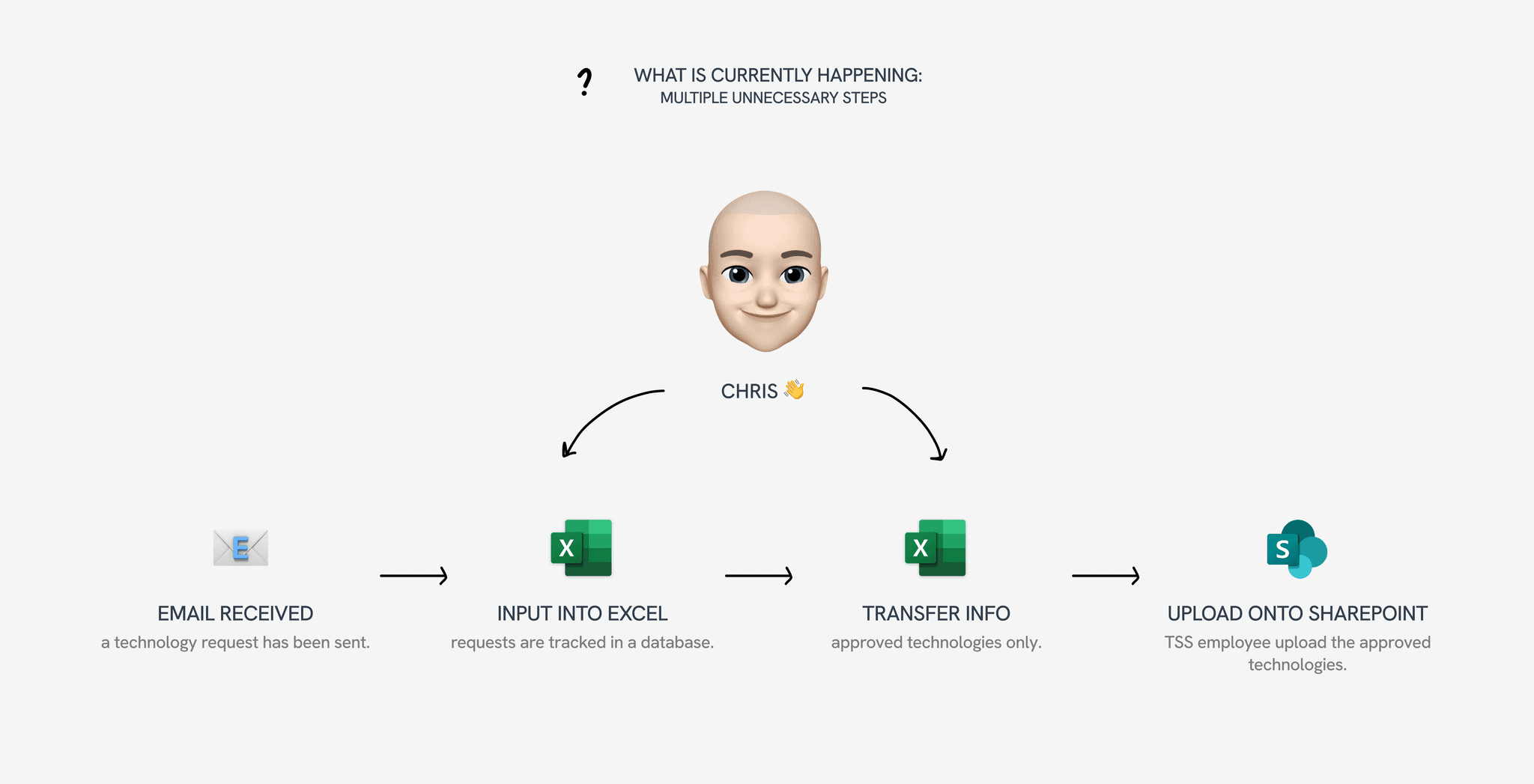
The Chief Privacy Officer (CPO), Chris, tracks technology requests in Excel. He then transfers them to an approved technologies sheet for reference. This information is later posted on the interdepartmental SharePoint site for County employees. Before it can appear on the site, however, someone from the Technology Services & Solutions (TSS) department must review and upload it. With the current workflow, there are too many steps involved in the process.
The Chief Privacy Officer (CPO), Chris, tracks technology requests in Excel. He then transfers them to an approved technologies sheet for reference. This information is later posted on the interdepartmental SharePoint site for County employees. Before it can appear on the site, however, someone from the Technology Services & Solutions (TSS) department must review and upload it. With the current workflow, there are too many steps involved in the process.
• MY TASK
How can I create an automated workflow process to improve productivity for the AI technology review process?
• User Interview
• User Interview
• User Interview
Identifying improvements
To get started, I conducted a 30 minute user interview with Chris to understand his goals. Which part of the process did he want automated? Which parts did he want control over?
He expressed that the extensiveness and duration of the workflow was a major pain point; it is not as efficient as it could be.
To get started, I conducted a 30 minute user interview with Chris to understand his goals. Which part of the process did he want automated? Which parts did he want control over?
He expressed that the extensiveness and duration of the workflow was a major pain point; it is not as efficient as it could be.
To get started, I conducted a 30 minute user interview with Chris to understand his goals. Which part of the process did he want automated? Which parts did he want control over?
He expressed that the extensiveness and duration of the workflow was a major pain point; it is not as efficient as it could be.
• CONFIDENTIATLITY
Due to confidentitality, I am unable to show the live automation. As an alternative, I made a mock video to show how the flow works:
• First Change
• First Change
• First Change
Transferring database to Microsoft Lists
To make his workflow more efficient, the proposal was the move his database from Excel to Microsoft Lists. With direct integration on Teams, Chris is able to stay on one platform … I transferred 40+ technology reviews over to Lists and customized each column based on need/efficiency. These minute changes really transform a workflow, not only visually, but with duration.
To make his workflow more efficient, the proposal was the move his database from Excel to Microsoft Lists. With direct integration on Teams, Chris is able to stay on one platform … I transferred 40+ technology reviews over to Lists and customized each column based on need/efficiency. These minute changes really transform a workflow, not only visually, but with duration.

• Initial Flow Building
• Initial Flow Building
• Initial Flow Building
Power Automate implementation
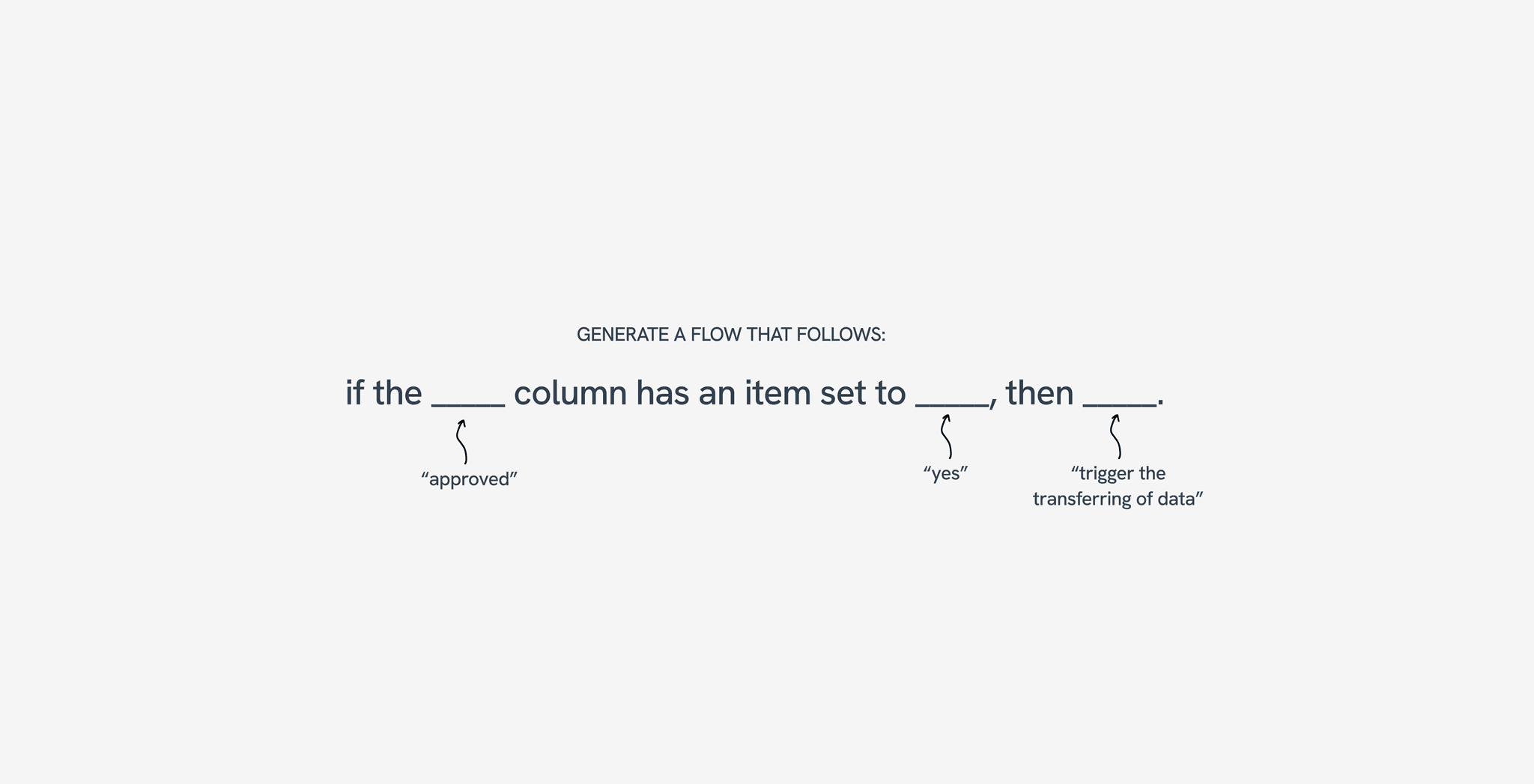
After making the transfer, I started setting up the automated flow. The flow must be able to pull only approved technologies from Microsoft Lists and input it into an official "Approved Technologies" Excel sheet, to be hosted onto our SharePoint site.
After making the transfer, I started setting up the automated flow. The flow must be able to pull only approved technologies from Microsoft Lists and input it into an official "Approved Technologies" Excel sheet, to be hosted onto our SharePoint site.
• Restrictions
• Restrictions
• Restrictions
Required columns & content
For Power Automate to read the contents within Microsoft Lists, I had to make some changes that slightly hinders the efficiency of some of the fields. For example, I had to make an "Approved?" text column. PowerApps will only approve of the string if it contains exactly the string, "Yes" and no other variation. Prior to this, I had the column set up to be a choice column where you can select either "Yes" or "No."
Ultimately, I made the decision to prioritize the workflow automation rather than saving a few seconds to click vs. type.
For Power Automate to read the contents within Microsoft Lists, I had to make some changes that slightly hinders the efficiency of some of the fields. For example, I had to make an "Approved?" text column. PowerApps will only approve of the string if it contains exactly the string, "Yes" and no other variation. Prior to this, I had the column set up to be a choice column where you can select either "Yes" or "No."
Ultimately, I made the decision to prioritize the workflow automation rather than saving a few seconds to click vs. type.
• Alternative Solutions
• Alternative Solutions
• Alternative Solutions
Flows I've iterated
Every day, it updates and creates a new file while simultaneously deleting the old file — technically feasible?
Every day, it wipes the table and adds the updated rows according to the Lists that day — technically feasible?
Add a tab on Excel each time the flow is ran to get an updated sheet each time, without hindering with past data.
Every day, it updates and creates a new file while simultaneously deleting the old file — technically feasible?
Every day, it wipes the table and adds the updated rows according to the Lists that day — technically feasible?
Add a tab on Excel each time the flow is ran to get an updated sheet each time, without hindering with past data.
• Final Flow
• Final Flow
• Final Flow
#2 takes the cake!
Everyday @ 5 A.M, a recurrence flow runs. It will delete all the rows present in a table and then update the rows w/ the most current data from the tracker. All modifications will be directly reflected.
Example: 18 approved technologies are in a table, but then you approved a new technology! Now, tomorrow at 5 A.M., you will get a new table that lists 19 approved technologies.
Everyday @ 5 A.M, a recurrence flow runs. It will delete all the rows present in a table and then update the rows w/ the most current data from the tracker. All modifications will be directly reflected.
Example: 18 approved technologies are in a table, but then you approved a new technology! Now, tomorrow at 5 A.M., you will get a new table that lists 19 approved technologies.
• Connecting to SharePoint
• Connecting to SharePoint
• Connecting to SharePoint
Embedment
After the flow successfully ran, I embedded the Excel sheet onto SharePoint! County employees can now refer to this list to see what AI technologies have been approved and which departments have the authority to use them. This ensures compliance with our office, along with County policies.
After the flow successfully ran, I embedded the Excel sheet onto SharePoint! County employees can now refer to this list to see what AI technologies have been approved and which departments have the authority to use them. This ensures compliance with our office, along with County policies.
• Additional Challenge
• Additional Challenge
• Additional Challenge
Internal & external sheet
As I was finishing up my flow, I received a Teams message from Chris stating that there should be 2 sheets! One for Approved Use Cases which is externally for all employees to see and one internally for GARC members only. The difference here is that the GARC members should be able to see all technologies, regardless of approval. In other words, a direct replica of the tracker onto an Excel sheet and onto the the SharePoint site for easy reference.
As I was finishing up my flow, I received a Teams message from Chris stating that there should be 2 sheets! One for Approved Use Cases which is externally for all employees to see and one internally for GARC members only. The difference here is that the GARC members should be able to see all technologies, regardless of approval. In other words, a direct replica of the tracker onto an Excel sheet and onto the the SharePoint site for easy reference.
• Process Documentation
• Process Documentation
• Process Documentation
The power of documentation
At the end of this project, I wrote up a documentation sheet on how to use Microsoft Lists, understand the automated flow, and the embedment on SharePoint. Documentation is super important here because of the technical aspects of this project. There is a learning curve to these softwares and I wanted to ensure that my CPO could understand the use cases and be able to smoothly transition into his new workflow.
At the end of this project, I wrote up a documentation sheet on how to use Microsoft Lists, understand the automated flow, and the embedment on SharePoint. Documentation is super important here because of the technical aspects of this project. There is a learning curve to these softwares and I wanted to ensure that my CPO could understand the use cases and be able to smoothly transition into his new workflow.
• Wrap-Up
• Wrap-Up
• Wrap-Up
Takeaways
Taking the lead on this project taught me how to be strategic within a tight timeframe. Given full autonomy to test edge cases and hand off the final deliverable, it was incredibly rewarding to get the opportunity to
Taking the lead on this project taught me how to be strategic within a tight timeframe. Given full autonomy to test edge cases and hand off the final deliverable, it was incredibly rewarding to get the opportunity to
• Testimonial
• Testimonial
• Testimonial
Thoughtful words from my boss :)
Big effort - high quality. Best Framer content out there.
Jan Dittrich
I’m building a new website and it’s absolutely ridiculous how valuable your content has been.
Michael Riddering
From the very beginning, she distinguished herself as both highly capable and self-driven. She helped automate process flows and improved several of our office’s operations, leaving a meaningful impact in just a short time.
Katelyn combines technical skill with curiosity, professionalism, and a genuine collaborative spirit. She is friendly, approachable, and someone who elevates the work of any team she joins. I have no doubt she will continue to excel in any role she pursues, and I wholeheartedly recommend her.
Chris Pahl, Chief Privacy Officer
Big effort - high quality. Best Framer content out there.
Jan Dittrich
I’m building a new website and it’s absolutely ridiculous how valuable your content has been.
Michael Riddering
From the very beginning, she distinguished herself as both highly capable and self-driven. She helped automate process flows and improved several of our office’s operations, leaving a meaningful impact in just a short time.
Katelyn combines technical skill with curiosity, professionalism, and a genuine collaborative spirit. She is friendly, approachable, and someone who elevates the work of any team she joins. I have no doubt she will continue to excel in any role she pursues, and I wholeheartedly recommend her.
Chris Pahl, Chief Privacy Officer
Big effort - high quality. Best Framer content out there.
Jan Dittrich
I’m building a new website and it’s absolutely ridiculous how valuable your content has been.
Michael Riddering
From the very beginning, she distinguished herself as both highly capable and self-driven. She helped automate process flows and improved several of our office’s operations, leaving a meaningful impact in just a short time.
Katelyn combines technical skill with curiosity, professionalism, and a genuine collaborative spirit. She is friendly, approachable, and someone who elevates the work of any team she joins. I have no doubt she will continue to excel in any role she pursues, and I wholeheartedly recommend her.
Chris Pahl, Chief Privacy Officer